Background Color
Let me ask you something.
When you open Netflix what is the very first thing you notice?
It is dark. The whole page is dark. That darkness is not just a design choice — it is a feeling. It says cinema. It says premium. It says sit back and relax.
That dark background is one single line of CSS. And you are about to write it.
What is Background Color
Every element on a webpage has a background. By default that background is transparent which means you just see
white. But you can change it to any color you want using the background-color property.
Netflix
body { background-color: rgba(0, 0, 0, 1); }The whole page turns black instantly.
That is it. One property, one value, and the entire mood of your page changes.
Background Color on Any Element
You are not limited to just the body. You can put a background color on any element — a heading, a paragraph, a button, a div, anything.
The button now has that Netflix red background.
This is how you start building real UI. A colored button on a dark background already starts to feel like a real product.
Background Color Using Hex Codes
Just like text color you can use hex codes, color names, RGB or RGBA for background colors. The property changes but the color values work exactly the same way.
Netflix
Unlimited movies, TV shows, and more.
body { background-color: rgba(0, 0, 0, 1); } h1 { color: white; } p { color: white; } button { background-color: rgba(229, 9, 20, 1); color: white; }
The page goes black, the text goes white, the button goes Netflix red.
Background Color Using RGBA
Remember RGBA from the last lesson? That transparency value becomes really useful with backgrounds.
Netflix
Unlimited movies, TV shows, and more.
body { background-color: rgba(0, 0, 0, 0.9); } h1 { color: white; } p { color: white; }Instead of a flat solid black you get a very slightly transparent black. The page behind it slightly shows through.
Now let me explain that last number because it is really important to understand.
That number is the opacity value. It goes from 0 to 1.
- 0 means completely invisible. You cannot see the color at all.
- 0.3 means very transparent. Just a hint of the color.
- 0.5 means half transparent. The color and whatever is behind it share equal presence.
- 0.7 means mostly visible. The color is strong but slightly see through.
- 0.9 means almost fully solid. Just the tiniest bit of transparency.
- 1 means fully solid. No transparency at all.
Think of it like tinted glass. A value of 0.2 is like very light sunglasses — you can still see through clearly. A value of 0.9 is like very dark tinted windows — almost opaque but not quite.
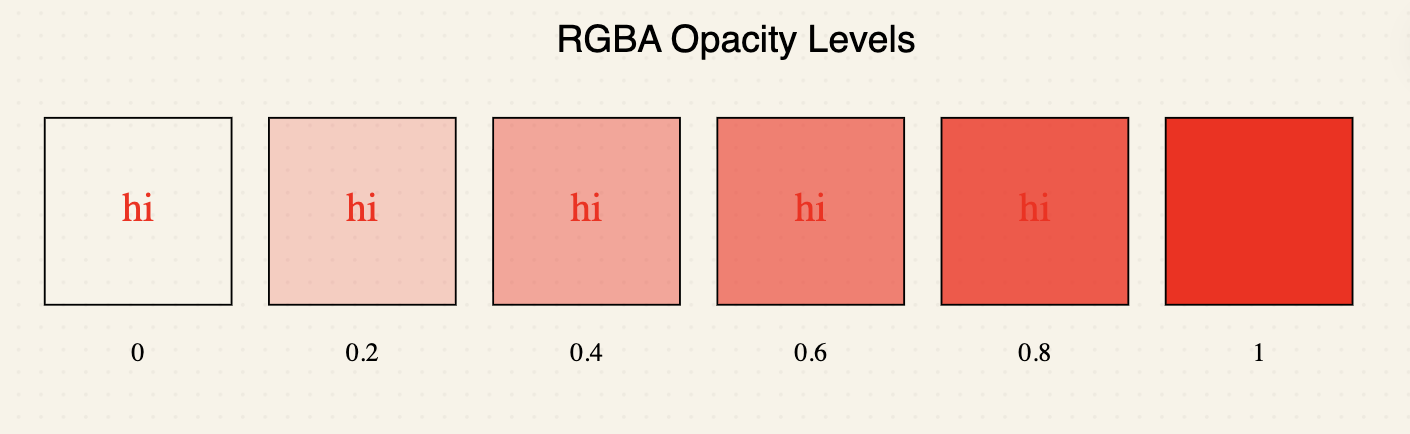
Why does this matter for backgrounds? Imagine you have a background image and you want to put a dark layer over it to
make the text readable. If you use a solid black it completely covers the image. But if you use
rgba(0, 0, 0, 0.6) the dark layer sits on top while the image still shows through underneath. That is
exactly the technique we used in the background image lesson.
Building the Netflix Clone
Now let us put this to work on our actual project. Try it yourself below — give the page a dark background, white text, and that Netflix red button.
Netflix
Unlimited movies, TV shows, and more.
Starts at USD 2.99. Cancel anytime.
Ready to watch? Enter your email to create or restart your membership.
body { background-color: rgba(0, 0, 0, 1); } h1 { color: white; } #netflix-logo { color: red; } p { color: white; } button { background-color: rgba(229, 9, 20, 1); color: white; }Dark background, white text, red button. Your Netflix clone just started looking like Netflix.
Have anything to say about this lesson?
Your feedback helps improve these tutorials. If something was confusing or missing, let us know.